Starting a New Job:
Your Tax Checklist
Last reviewed: April 2026
Getting your tax right from day one avoids emergency codes, overpayments and annoying HMRC letters. Here is exactly what to do.
At a glance
- ✓Always give your new employer your P45 on day one — it transfers your tax code and year-to-date figures
- ✓Without a P45, complete a Starter Checklist to avoid an emergency BR or 0T code
- ✓Check your first payslip: your tax code should be 1257L (or S1257L / C1257L) for a main job
- ✓Any tax overpaid through an emergency code is refunded automatically through your payslip
New job tax checklist
Give your new employer your P45 from your previous job on day one
If you have no P45, complete a Starter Checklist (formerly P46) — statement A, B or C
Check your first payslip shows the correct tax code (usually 1257L)
Verify your NI number is shown correctly on your payslip
If your code is BR, 0T or ends in W1/M1, contact HMRC to correct it
Register for a Personal Tax Account at gov.uk to monitor your code
Your P45: what it is and why it matters
A P45 is a document your old employer gives you when you leave. It shows your tax code at the time of leaving, your total pay to date for the tax year, and the total tax deducted. This allows your new employer to pick up exactly where the old one left off — applying the right code and not re-using your Personal Allowance.
Give Part 2 and Part 3 of your P45 to your new employer. Keep Part 1A for yourself. If your employer now operates digitally, they may only need you to provide the information verbally or via a form — check with your HR or payroll team.
If you have lost your P45, do not panic. Complete a Starter Checklist instead. Your new employer can still process your first payment — they will just use a default emergency code until HMRC provides the correct one.
Full P45 guideNo P45? Use the Starter Checklist
If you do not have a P45 — because it is your first job, you have lost it, or you are re-entering the workforce — your employer will ask you to complete a Starter Checklist. It has three statements:
Statement A
This is your first job since 6 April and you have not received JSA, ESA or a state or occupational pension. → Code 1257L on a cumulative basis.
Statement B
This is your only job now, but you have had a previous job or taxable benefit since 6 April. → Code 1257L W1/M1 (non-cumulative) until HMRC updates.
Statement C
You have another job or a pension. → Code BR — all income from this job taxed at 20% flat, no Personal Allowance applied here.
Choosing the wrong statement is common but fixable. If you pick Statement A when Statement B applies, you will likely get too much Personal Allowance and owe tax at the end of the year. Choosing Statement B when A applies means you will be on a non-cumulative code until HMRC sorts it out — less harmful but worth correcting.
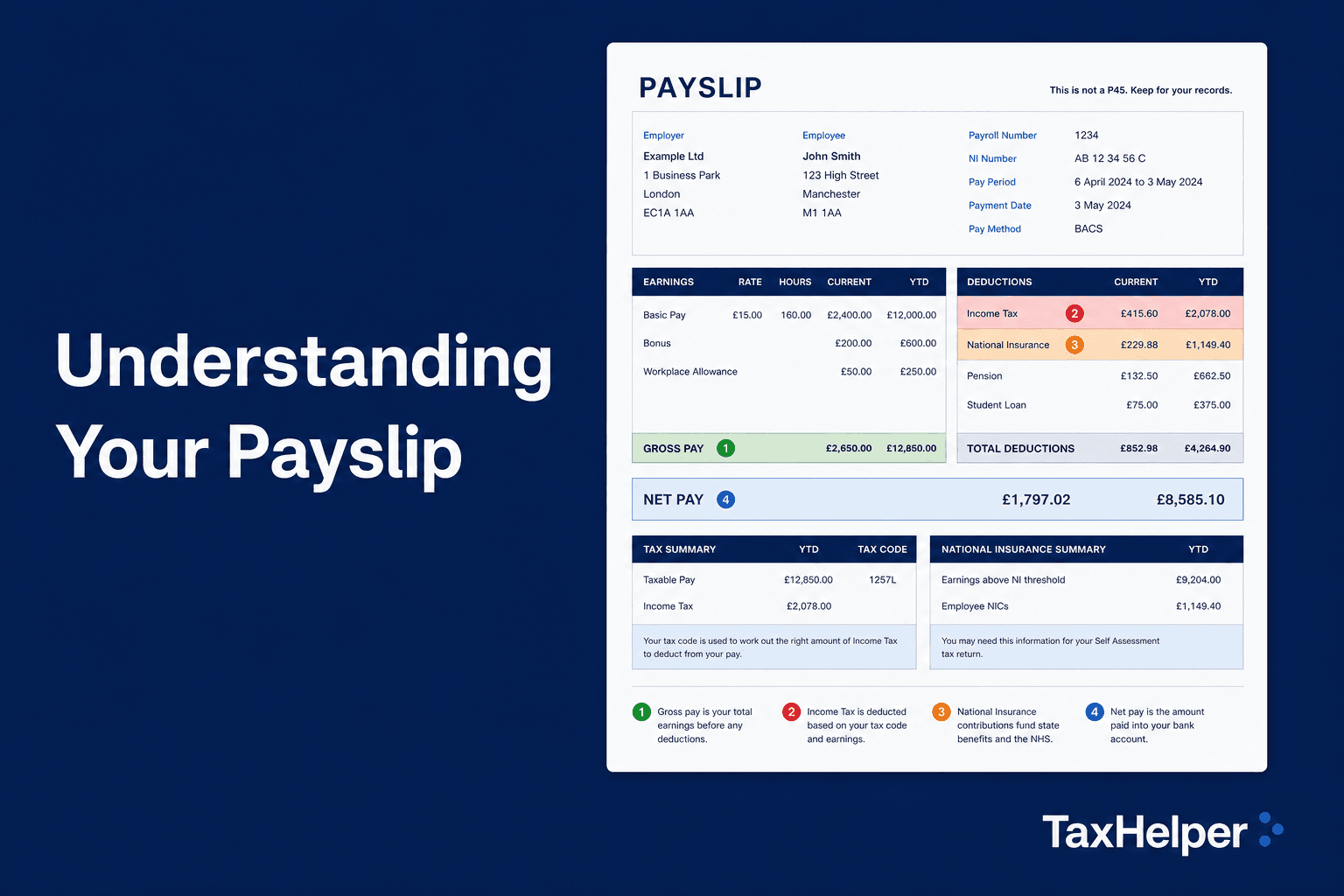
Checking your first payslip
Your first payslip is a key document. Check these things:
- 1Tax code: should be 1257L (or S/C prefix for Scotland/Wales). If it shows BR, 0T or ends in W1/M1 without explanation, investigate.
- 2Gross pay: should match your agreed salary ÷ 12 (monthly) or ÷ 52 (weekly). Pro-rata pay is common for part-month starts.
- 3NI deductions: employee NI is 8% on earnings between £12,570 and £50,270 per year. Check the deduction looks proportionate.
- 4Pension: if your employer has auto-enrolled you, you will see pension deductions from month 1 (or after qualifying period).
Frequently asked questions
Frequently asked questions
What is a Starter Checklist and when do I need one?
A Starter Checklist (the replacement for the P46 form) tells your new employer which statement applies to your employment situation: A (this is your only job and you have not received taxable income or JSA since last 6 April), B (this is now your only job but you have had other employment), or C (you have another job or receive a pension). Statement C results in a BR code (20% flat) on your new job.
Why is my new employer taxing me on an emergency code?
Emergency codes (BR, 0T, or 1257L W1/M1) are applied when your employer does not have enough information to give you the correct code. Providing your P45 or completing a Starter Checklist usually resolves this. If it persists after week 2, call HMRC on 0300 200 3300.
How long does it take for HMRC to update my tax code?
Once HMRC receives information from your employer (which happens when they first pay you through RTI), they usually issue a new coding notice within 2–4 weeks. Overpaid tax from an emergency code is automatically refunded through your payslip once the correct code is applied.
Do I need to do anything if my new job pays less than my old one?
Not necessarily. If your total income for the tax year is below the higher-rate threshold, HMRC will automatically reconcile any over- or under-payment in the P800 end-of-year calculation. If you think you will significantly overpay, you can ask HMRC to review your code mid-year.