Your P60 Has Arrived — Here Is What to Do With It
By TaxHelper Editorial
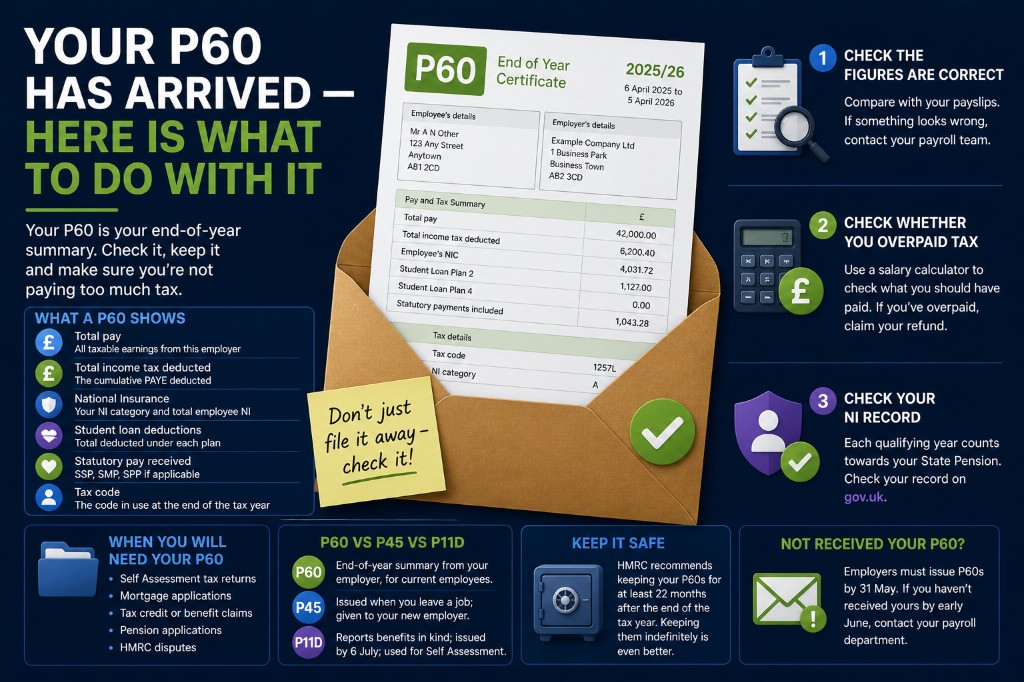
Every year, by 31 May, your employer must give you a P60. It is a summary of everything you earned and paid in tax from 6 April to 5 April. Most people file it away and never look at it. Here is why that is a mistake.
What a P60 Shows
Your P60 contains the following information for the complete tax year:
- Total pay — all taxable earnings from this employer
- Total income tax deducted — the cumulative PAYE deducted
- National Insurance contributions — your NI category and total employee NI paid
- Student loan deductions — total deducted under each plan
- Statutory pay received — SSP, SMP, SPP if applicable
- Tax code — the code in use at the end of the tax year
If you had more than one job in the tax year, you will receive a P60 from each employer — but only for periods when you were their employee. Earnings from previous jobs in the same year will appear on a P45 rather than the P60.
Step 1: Check the Figures Are Correct
Add up your payslips for the year. Your total gross pay on those payslips should match the "Total pay" figure on your P60. Discrepancies are rare but do happen — particularly around bonuses, commission, expenses, or changes in employment mid-year.
If you spot a discrepancy, raise it with your payroll department first. If the error is in the HMRC figures (not your employer's), contact HMRC directly.
Step 2: Check Whether You Overpaid Tax
Take your total income tax figure and use our salary calculator to verify what you should have paid. Common reasons for overpayment include:
- An emergency tax code applied for part of the year
- Starting a job mid-year on a W1/M1 basis
- A period of unemployment partway through the year
- Leaving a job and not working again before 5 April
If you paid too much, HMRC will usually issue a P800 refund notice by September. You can claim earlier via your Personal Tax Account at gov.uk — refunds typically land in your bank within five working days.
Step 3: Check Your NI Record
Your P60 confirms that you made NI contributions during the year. Each qualifying year of NI contributions counts towards your State Pension. You need 35 qualifying years for the full new State Pension (£221.20/week in 2026/27). Check your NI record at gov.uk to confirm years are being recorded correctly.
When You Will Need Your P60
Keep your P60 — you will be surprised how often it is useful:
- Self Assessment tax returns — if you need to file, your P60 figures go into the employment section
- Mortgage applications — lenders use P60s as proof of income
- Tax credit or benefit claims — often require prior-year income figures
- Pension applications — may require historic income evidence
- HMRC disputes — if HMRC claims you underpaid in a previous year, your P60 is your primary evidence
HMRC recommends keeping your P60s for at least 22 months after the end of the tax year they relate to. In practice, keeping them indefinitely is sensible — they are small documents (physical or PDF) and cost nothing to store.
P60 vs P45 vs P11D
- P60 — End-of-year summary from your employer, provided to current employees only
- P45 — Issued when you leave a job; summarises pay and tax to that point in the tax year; given to your new employer
- P11D — Reports benefits in kind (company car, private health insurance etc.); issued by 6 July after the tax year ends; used for Self Assessment
What If You Have Not Received Your P60?
Employers must issue P60s by 31 May. If you have not received yours by early June, contact your payroll department — it may have been sent to an old address or email. If you are a former employee, note that your employer is not obliged to issue a P60 after you leave — your P45 serves a similar purpose for the period you worked there.